Homelab · Case study
Securxlab — Homelab SOC & Self-Healing Command Center
A self-built security operations dashboard for my homelab: SIEM with MITRE ATT&CK-mapped detections, alert triage and threat intel, plus Proxmox, UniFi and camera control, all driven by n8n automation with human-in-the-loop approvals.
- 13Custom detection rules, each with a severity
- 7MITRE ATT&CK techniques mapped across 5 tactics
- ~1.4kSecurity events ingested & correlated per day
- 6Log sources: scanner, UniFi, cameras, web, Proxmox, dashboard
- 5 minSelf-healing watchdog cycle
- 0Patches applied without my approval
Screenshots
Sensitive values (IPs, MACs, hostnames, camera feeds) are redacted.
The problem
My lab grew into a three-node Proxmox cluster, a full UniFi network, cameras and a SIEM — each with its own console, its own alerts and its own way of failing quietly. I wanted what a SOC analyst works from every day: one pane of glass, detections I can trust, a real triage workflow, and automation that handles the routine so I can focus on what's unusual.
What I built
Securxlab is a custom security operations dashboard backed by n8n workflows. It has twelve modules — Home, Cameras, Network, Proxmox, Backups, SIEM, Alerts, Audit logs, Ring, Smart home, Media and Settings — and a command bar for running actions without leaving the page.
Detection & response (SIEM)
- Detection engineering — 13 custom rules covering repeated failed sign-ins, port scans, repeated intrusion detections, web attacks (XSS, SQLi, path traversal, command injection), new devices, sign-ins from new addresses, risky host configuration and software listed in CISA's Known Exploited Vulnerabilities catalog. Each rule has a severity, a threshold window and live hit counts.
- MITRE ATT&CK mapping — detections roll up to ATT&CK techniques (e.g. T1110 Brute Force, T1078 Valid Accounts, T1595 Active Scanning, T1190 Exploit Public-Facing Application), grouped by tactic, so activity reads the way an analyst thinks about an intrusion.
- Alert triage — an alert queue with severity, entity, hit counts and an open → acknowledged → closed workflow, filterable by rule, address or host.
- Investigation — event search with a field query language (for example
source:unifi and severity>=high), a severity histogram you can click to drill into a time window, and CSV export. - Threat intelligence — a live threat map and feed of blocked probes and sign-in attacks using an offline GeoIP database, plus top source countries, addresses, detections and event categories.
- Vulnerability & configuration management — a host scanner checks every node, VM and container for pending updates, listening ports, SSH settings and firewall state, and flags risky settings as findings.
Operations & automation
- Unified visibility — cluster, node, VM and container health; UniFi traffic, clients, Wi-Fi, VLANs and firewall; camera live view, snapshots and clips; home-security arm/disarm.
- Self-healing — a watchdog runs every 5 minutes and restarts guests that are meant to be running but have failed, leaving intentionally stopped machines alone.
- AI-assisted repair — when something breaks, a workflow sends the error to a locally hosted LLM, applies the suggested fix and reports back. In testing it diagnosed a VM stuck on a stale backup lock, cleared it and brought the VM back online by itself.
- Change control — a nightly job finds updates across every node and guest, snapshots each guest first, and patches nothing until I approve it. If no approval arrives in time, the run is skipped and logged — the same human-in-the-loop discipline as ITIL change management.
- Reliable alerting — alerts and approvals land in the dashboard first; Discord, ntfy and Uptime Kuma are an independent fallback if the dashboard itself is down.
Architecture
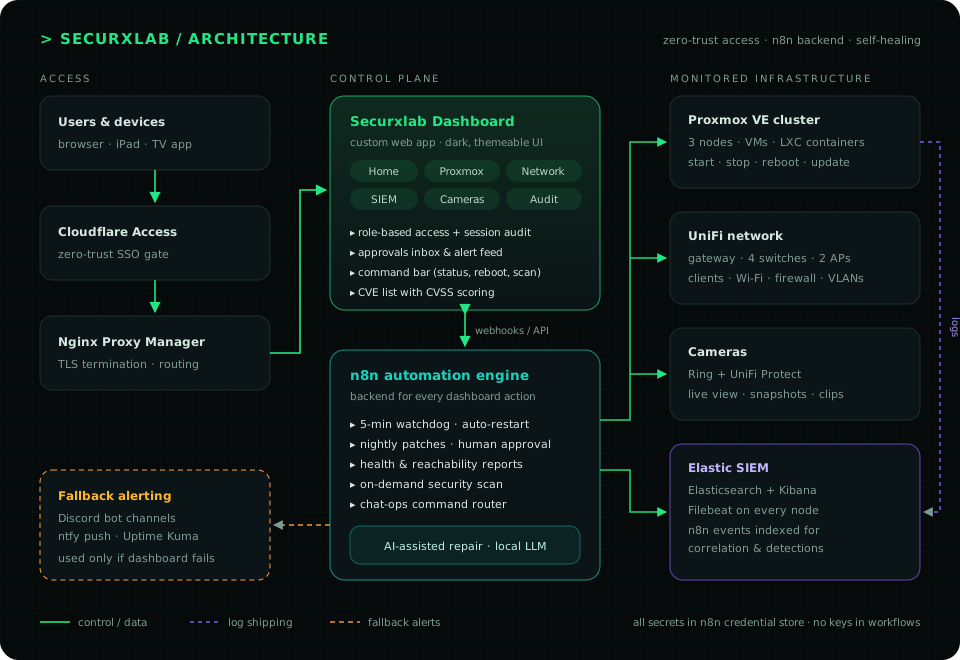
The dashboard is a fast front end; n8n is the backend for every action, which keeps credentials and integrations in one hardened place. Log sources feed a central event store where detection rules run, and Filebeat ships host logs to Elasticsearch so automation activity can be correlated with system logs.
Security by design
- Zero-trust access — the dashboard is never exposed directly; it sits behind Cloudflare Access SSO and Nginx Proxy Manager with TLS.
- Least privilege — role-based accounts (for example, admins vs. camera-only viewers who see only selected cameras), and a rule that fires when an account repeatedly tries things it isn't allowed to do.
- Tamper-evident auditing — every sign-in, page view, action and data ingest is logged, and an integrity check confirms that no entry has been edited or removed.
- Secrets hygiene — API keys and tokens live only in n8n's encrypted credential store, never in workflow JSON, chat or the front end.
- Eating my own dog food — the scanner audits my own hosts too, and its findings drive my hardening backlog — for example, standardizing SSH on key-only authentication with a separate key per workstation, rolled out one node at a time to avoid lockouts.
Problems I solved along the way
- Local LLM timeouts — profiled the container running the model, found it was memory-starved, right-sized its RAM and benchmarked token throughput to decide where local inference fits and where a hosted model is the better choice.
- Discord API 403 "Missing Access" — traced it to bot channel permissions rather than the workflow, then split notifications into dedicated channels (alerts, approvals, updates, health, activity).
- SIEM stability — capped the Elasticsearch JVM heap so the SIEM VM stays stable alongside the rest of the lab.
- Safe maintenance windows — designed staggered reboots (VMs and containers weekly, nodes monthly, never two nodes at once) to keep downtime minimal.
Skills demonstrated
| Area | How it shows up |
|---|---|
| Detection engineering | 13 threshold & signature rules with severities; MITRE ATT&CK mapping |
| Alert triage & investigation | Severity-based queue, acknowledge/close workflow, query-language event search |
| Threat intelligence | GeoIP enrichment, CISA KEV matching, top-talker analysis |
| Vulnerability management | Host scanning for updates, open ports and risky configuration |
| Incident response automation | Detect → diagnose → remediate → report, with human approval gates |
| Identity & access | Zero-trust SSO, RBAC, tamper-evident audit logging |
| Infrastructure & automation | Proxmox, UniFi, Docker, n8n workflows, REST APIs, webhooks, LLM integration |
What's next
- Native apps for iPad and Fire TV that stay in sync with the web version.
- Expanding the Smart Home module through Home Assistant.
- Moving AI-assisted repair to a faster hosted model for quicker diagnoses.
All screenshots are from the live system with IP addresses, MAC addresses, hostnames, account names and camera footage redacted.
More projects
All projects3-Node Proxmox Cluster
The foundation of my lab: a three-node Proxmox VE cluster running my SIEM, automation, web and home services as VMs and containers, with approval-gated patching, a self-healing watchdog and key-only SSH.
Proxmox VEKVMLXCDocker+5
Elastic SIEM + MISP
A dedicated Elastic SIEM for my lab: Filebeat ships host logs from every Proxmox node over TLS, automation events land in their own index, and MISP adds threat intelligence, all so I can investigate the way a SOC analyst does.
Elasticsearch 8KibanaFilebeatMISP+3
n8n + Discord Ops Bot
AI-assisted n8n workflows that watch my Proxmox cluster around the clock: they restart failed guests, scan for updates and wait for my approval, diagnose errors with an LLM, and report through the dashboard, with Discord as the fallback.
n8nProxmox APIOllama (llama3)Claude API+5